

What Are Chips in F1 Fantasy?
Chips are single-use power-ups that modify your team's scoring or transfer rules for one race weekend. F1 Fantasy 2026 offers six chips, each usable once per season. Using the right chip at the right moment can swing your season standings by hundreds of points. Using them poorly wastes a limited resource you can't get back.
Three chips are available from the start of the season. The other three unlock after the first race, giving you time to understand the competitive landscape before making high-stakes chip decisions.
TL;DR: F1 Fantasy has 6 chips in 2026: Autopilot (auto-assigns boost), x3 Boost (triple points for top driver), No Negative (zeros out negatives), Wildcard (unlimited free transfers), Limitless (no budget cap), and Final Fix (one free transfer between qualifying and race). Time them around dominant weekends, sprint events, and major team restructuring for maximum impact.
Chip 1: Autopilot (Available Immediately)
Autopilot automatically assigns your DRS Boost to whichever driver on your team scores the highest that weekend. You don't need to predict who'll perform best — the chip makes the optimal DRS Boost assignment retroactively.
How It Works
Normally, you manually assign the DRS Boost (x2 multiplier) before the team lock. If you pick the wrong driver, you leave points on the table. Autopilot removes this risk by guaranteeing the boost goes to your highest scorer.
When to Use Autopilot
When your team has 3+ drivers who could realistically be the top scorer. If you're running a balanced team where any of three drivers might have the best weekend, Autopilot captures the upside without the guessing game.
When you can't follow the weekend closely. If you know you won't be able to check practice results, qualifying, and sprint data before making your DRS Boost decision, Autopilot ensures you don't waste the multiplier.
When to avoid it: If your team has one clearly dominant driver (e.g., a driver at their best track who's been on a hot streak), you don't need Autopilot. Just assign the DRS Boost manually and save the chip for a more uncertain weekend.
Points Impact
Autopilot's value equals the difference between your best and second-best driver's score. If your top driver scores 35 and your second scores 28, Autopilot gained you (35-28) = 7 extra points by ensuring the boost went to the right driver. The average gain is around 5-10 points, depending on how spread your drivers' scores are.
Chip 2: x3 Boost (Available Immediately)
The x3 Boost is the highest-ceiling chip in F1 Fantasy. It gives your top-scoring driver a x3 multiplier instead of the usual x2, and your second-highest scorer gets x2.
How It Works
Without x3: Best driver x2, everyone else x1. With x3: Best driver x3, second-best driver x2, everyone else x1.
Example: If your top driver scores 40 and your second scores 30:
- Without chip: 40x2 + 30x1 = 110
- With x3: 40x3 + 30x2 = 180
That's 70 extra points from one chip activation.
When to Use x3 Boost
On sprint weekends when your top driver will dominate. Sprint weekends generate more total points because of the extra scoring session. x3 on a sprint weekend amplifies all sprint + qualifying + race points. If your top driver scores 45 across all sessions, that's 135 instead of 90.
At tracks with historically predictable outcomes. Circuits like Monaco, Singapore, and Hungary strongly reward qualifying position. If your top driver consistently qualifies on the front row at these tracks, x3 captures the predictable upside.
When you can pair it with Autopilot logic. Since x3 automatically goes to your highest scorer, you don't need to worry about assigning it to the wrong driver. But you still need confidence that one driver will clearly outscore the rest of your team.
When to Avoid x3 Boost
Don't use x3 when outcomes are uncertain (e.g., first race at a new circuit, unpredictable weather). The chip's value depends on having a standout performer. If all your drivers score similarly, x3 adds little.
Chip 3: No Negative (Available Immediately)
No Negative floors all negative scoring at zero for the entire weekend. DNFs, positions lost, and any other negative points become 0 instead of dragging down your total.
How It Works
Every scoring category is evaluated independently. If a category produces a negative value, it becomes 0. Positive categories are unaffected.
Example without No Negative: A driver qualifies P3 (+8), finishes P15 (0), loses 12 positions (-12), DNF penalty applies = total -4. With No Negative: Qualifying +8, race 0, positions lost floored at 0, DNF floored at 0 = total +8.
When to Use No Negative
At races with historically high DNF rates. Street circuits (Monaco, Singapore, Baku, Las Vegas) and races in wet conditions produce more crashes and retirements. No Negative protects you from the -20 race DNF and -10 sprint DNF penalties.
When you have risky but high-ceiling drivers. Some drivers are aggressive overtakers who either finish brilliantly or DNF trying. No Negative lets you keep these high-variance drivers without the downside. The upside is unchanged, but the floor is raised.
On sprint weekends with volatile conditions. Sprint weekends have both a sprint (-10 DNF) and a race (-20 DNF). No Negative protects against both, covering up to -30 of potential downside per driver.
Points Impact
No Negative's value equals the total negative points zeroed out. If two of your drivers DNF (one in the sprint, one in the race), No Negative saves you 10 + 20 = 30 points. On a clean weekend with no incidents, it saves 0. Use it when you expect chaos.
Chip 4: Wildcard (Unlocks After Race 1)
The Wildcard gives you unlimited free transfers for one race week. Normally, extra transfers cost fantasy points. With the Wildcard, you can rebuild your entire team from scratch.
How It Works
Activate the Wildcard before the team lock. You can make as many transfers as you want within the budget cap. No transfer penalties apply. After the weekend, your new team persists — you don't revert to your old lineup.
When to Use Wildcard
After major competitive reshuffles. When a team brings a significant upgrade that reshuffles the midfield, or when regulation changes alter the pecking order, you need to restructure your team. The Wildcard lets you do this without burning 5+ transfers worth of penalty points.
During the growth-to-points transition. If you've been running a budget-growth focused team for 4-5 races and your budget has reached $105M+, the Wildcard lets you pivot to a full points-maximizing lineup in one clean move. See our budget strategy guide for details on this transition.
NOT on sprint weekends (usually). The earlier lock deadline on sprint weekends means less practice data to inform your Wildcard rebuild. Save it for a standard weekend where three practice sessions give you maximum information.
Combining Wildcard with the Optimizer
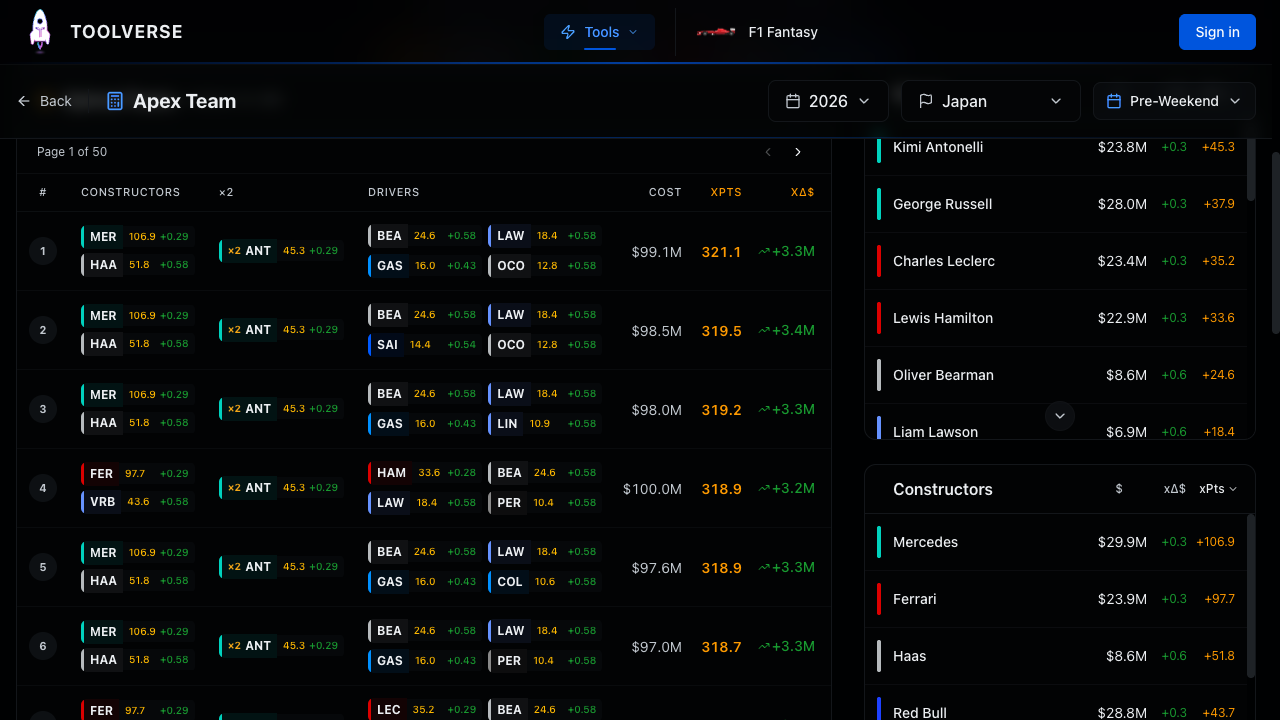
Use the Apex Team Optimizer during your Wildcard weekend. Since you can change every position freely, the optimizer's #1 ranked team becomes directly actionable. Without the Wildcard, you're constrained by transfer limits and might not be able to reach the optimal lineup.
Chip 5: Limitless (Unlocks After Race 1)
Limitless removes the budget cap for one race weekend. You can build a team of any cost, even $130M+ of drivers and constructors. After the weekend, your original team is restored.
How It Works
Activate Limitless before the team lock. The $100M cap disappears. Build the most expensive, highest-scoring team possible. After the race, your pre-Limitless team returns automatically. No transfers are consumed, and price changes during the Limitless weekend don't affect your actual team.
When to Use Limitless
When the gap between your optimal team and the dream team is largest. If your budget is $100M but the best possible team costs $125M, Limitless captures that gap. The more expensive the optimal team, the more valuable Limitless becomes.
Mid-to-late season when prices have inflated. As the season progresses, top drivers' prices rise. By Race 12-15, the best possible team might cost $120-125M. Limitless lets you field this team for one weekend without having earned the budget organically.
On a predictable, high-scoring weekend. Pair Limitless with a weekend where the competitive order is clear. You're spending your chip on one weekend, so make it count. Choose a race at a track with historically predictable results.
Key Detail: Team Restoration
Your original team comes back after the Limitless weekend. This means price changes that happen during the Limitless weekend don't benefit you. Don't use Limitless purely for budget growth — use it for a one-weekend points surge.
Chip 6: Final Fix (Unlocks After Race 1)
Final Fix gives you one free transfer between qualifying and the race start. This lets you react to qualifying results — a dropped-out driver, a surprise grid penalty, or a mechanical failure — without any transfer penalty.
How It Works
After qualifying, a short transfer window opens. You can make exactly one transfer during this window. The transfer is free (no point penalty) and permanent (your new driver stays on your team). Normal rules apply: the replacement driver must fit within your budget.
When to Use Final Fix
When your DRS Boost driver has a disastrous qualifying. If the driver you assigned the x2 multiplier to qualifies P18 instead of their expected P5, Final Fix lets you swap them out before the race. This is the highest-value play because a bad DRS Boost assignment costs double.
When a driver suffers a mechanical failure in qualifying. A car that breaks in qualifying might not start the race, giving you -5 (no qualifying time) plus -20 (DNF). Final Fix lets you replace them before the damage compounds.
When grid penalties shuffle the order. If a driver on your team takes an engine penalty after qualifying and drops from P3 to P13, their positions-gained potential changes dramatically. Final Fix lets you react.
Strategic Caution
Final Fix is useful but low-ceiling compared to other chips. It saves you from one bad qualifying result but doesn't amplify points. Use it on a weekend where qualifying drama is likely (wet qualifying, street circuits) rather than burning it at a predictable round.
Chip Timing Strategy Across the Season
Here's a suggested chip deployment timeline for a 24-race season:
| Phase | Races | Recommended Chips | Reasoning |
|---|---|---|---|
| Early season | 1-4 | Autopilot | Low commitment, covers uncertainty while you learn the competitive order |
| Growth phase | 5-8 | Wildcard | Restructure from growth team to points team at peak budget |
| Mid-season | 9-14 | x3 Boost, No Negative | Deploy on the strongest sprint weekend and the most chaotic race |
| Late season | 15-20 | Limitless | Maximum value when dream team prices peak |
| End game | 21-24 | Final Fix | Save for a critical qualifying disaster in the title run |
This is a guideline, not a rigid plan. If a perfect opportunity appears earlier, take it. The worst mistake is saving chips for a "better moment" that never comes and ending the season with unused chips.
How the Apex Team Optimizer Models Chips
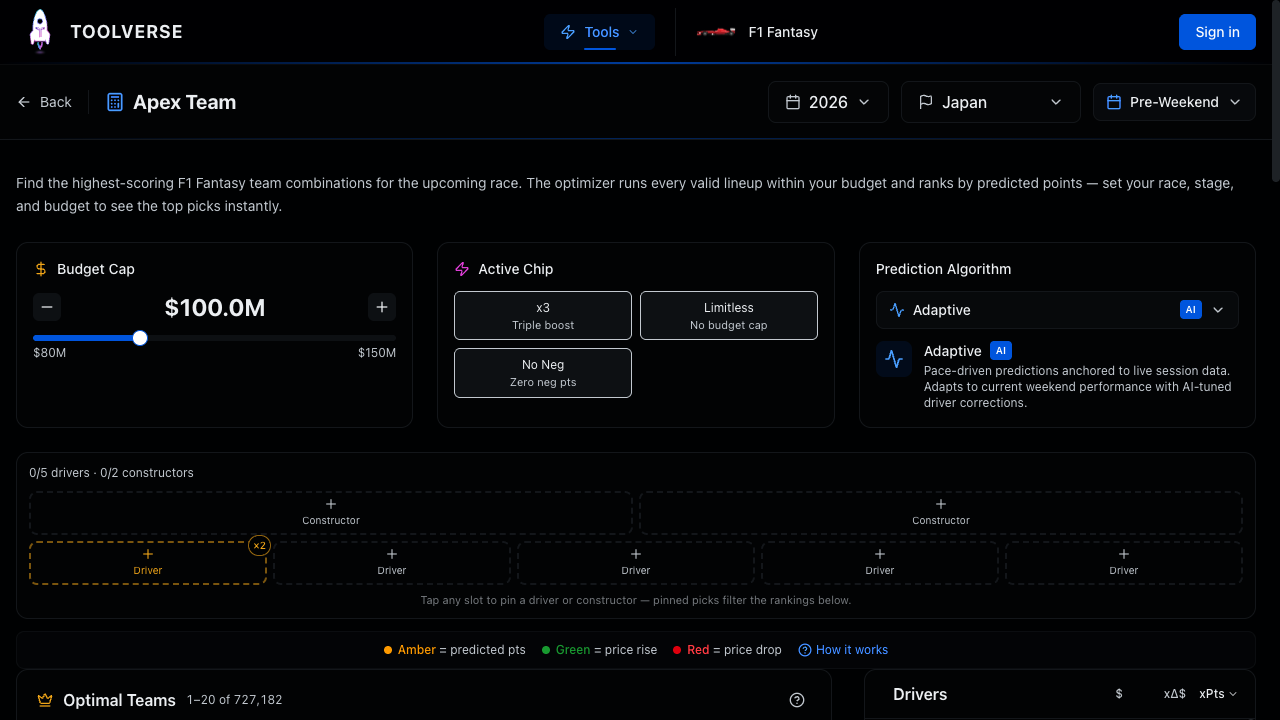
The Apex Team Optimizer supports chip simulation for x3, Limitless, No Negative, and Wildcard. When you activate a chip:
- x3: The optimizer assigns x3 to the highest predicted scorer and x2 to the second highest, maximizing the multiplier impact
- Limitless: The budget slider becomes irrelevant; the optimizer considers all teams regardless of cost
- No Negative: DNF penalties are floored at zero in the prediction model, boosting expected scores for volatile drivers
- Wildcard: No scoring change, but signals you can freely rearrange to match the optimizer's top pick
All 697,680 combinations are recalculated instantly when you toggle a chip. Compare the top team with and without a chip to see its expected impact before committing.
Frequently Asked Questions
Can I use two chips on the same weekend?
No. Only one chip can be active per race weekend. Choose the single most impactful chip for each situation. The exception is Autopilot, which some interpretations suggest can be considered alongside DRS Boost strategy, but the official rules state one chip per weekend.
Do unused chips carry over to next season?
No. All six chips must be used within the current season or they're lost. There's no advantage to saving chips beyond strategic timing. Make sure every chip gets deployed before the final race.
Which chip has the highest average point impact?
The x3 Boost typically has the highest ceiling (50-80 extra points on a great weekend). Limitless is second (30-60 extra points). No Negative and Wildcard depend entirely on circumstances (0-40 points). Autopilot and Final Fix are the lowest-impact chips (5-20 points) but also the lowest-risk.
Should I save my best chips for the final races?
Not necessarily. The final races aren't inherently higher-scoring. Use chips when the conditions are optimal regardless of calendar position. A perfect x3 weekend in Race 8 is worth more than a mediocre x3 weekend in Race 24.
What happens if I activate a chip but then my team locks without changes?
The chip is still consumed. Activating a chip commits it for that weekend, even if your team doesn't change. Be certain before activating.
Plan Your Chip Strategy
Chips are your most powerful tools in F1 Fantasy. Deploy them thoughtfully across the season for maximum impact. Use the Apex Team Optimizer to simulate each chip's effect before committing, check our sprint weekend guide for sprint-specific chip timing, and read the full scoring rules to understand exactly which points each chip affects. New to the game? Start with our beginner's guide.