
What Is the Apex Team Optimizer?
The Apex Team Optimizer is a prediction-powered team builder that evaluates every valid F1 Fantasy team combination to find the one most likely to score the highest points. Instead of guessing which five drivers and two constructors to pick, the optimizer runs Monte Carlo simulations across all 697,680 possible lineups within your $100M budget and ranks them by predicted performance.
F1 Fantasy gives you 20 drivers and 10 constructors to choose from. That's C(20,5) times C(10,2) = 697,680 valid team combinations. No human can evaluate all of those in the minutes before the team lock deadline. The Apex Team does it in under a second.
TL;DR: The Apex Team Optimizer uses Monte Carlo simulations to rank all 697,680 possible F1 Fantasy team combinations by predicted points. Pick your algorithm, set your budget, optionally lock in favorite drivers, and the tool shows the top 20 highest-scoring lineups within seconds. It's the fastest way to build a competitive team before every race weekend.
How Does the Optimizer Calculate the Best Teams?
The optimizer runs 10,000 independent race simulations for every driver and constructor on the grid. Each simulation models qualifying position, race finishing order, overtakes, DNF probability, fastest lap chances, and Driver of the Day odds based on historical data. The output isn't a single guess. It's a probability distribution showing expected points, best-case (P90), and worst-case (P10) outcomes.
Once every driver and constructor has a predicted score, the optimizer generates all valid 5-driver + 2-constructor combinations that fit within your budget. Each team gets a total predicted score based on the sum of its members' expected points, including the DRS Boost multiplier applied to the highest-scoring driver.
Teams are then ranked from highest to lowest predicted points. You see the top 20, but the tool has evaluated every single one of the 697,680 possibilities. There are no shortcuts or greedy approximations. It's an exhaustive search.
Why Monte Carlo Instead of Simple Averages?
Simple season averages miss too much. A driver who scores 30 points one weekend and 5 the next has the same average as one who consistently scores 17-18. But their risk profiles are completely different. Monte Carlo captures this variance by simulating thousands of race outcomes, giving you both the expected score and the uncertainty around it.
How to Use the Apex Team: Step-by-Step
Here's how to build your optimal team in under 60 seconds:
Step 1: Select Your Race Weekend
Open the Apex Team page and choose the season and upcoming race from the dropdown. The tool loads all available data for that weekend automatically.
Step 2: Choose a Prediction Algorithm
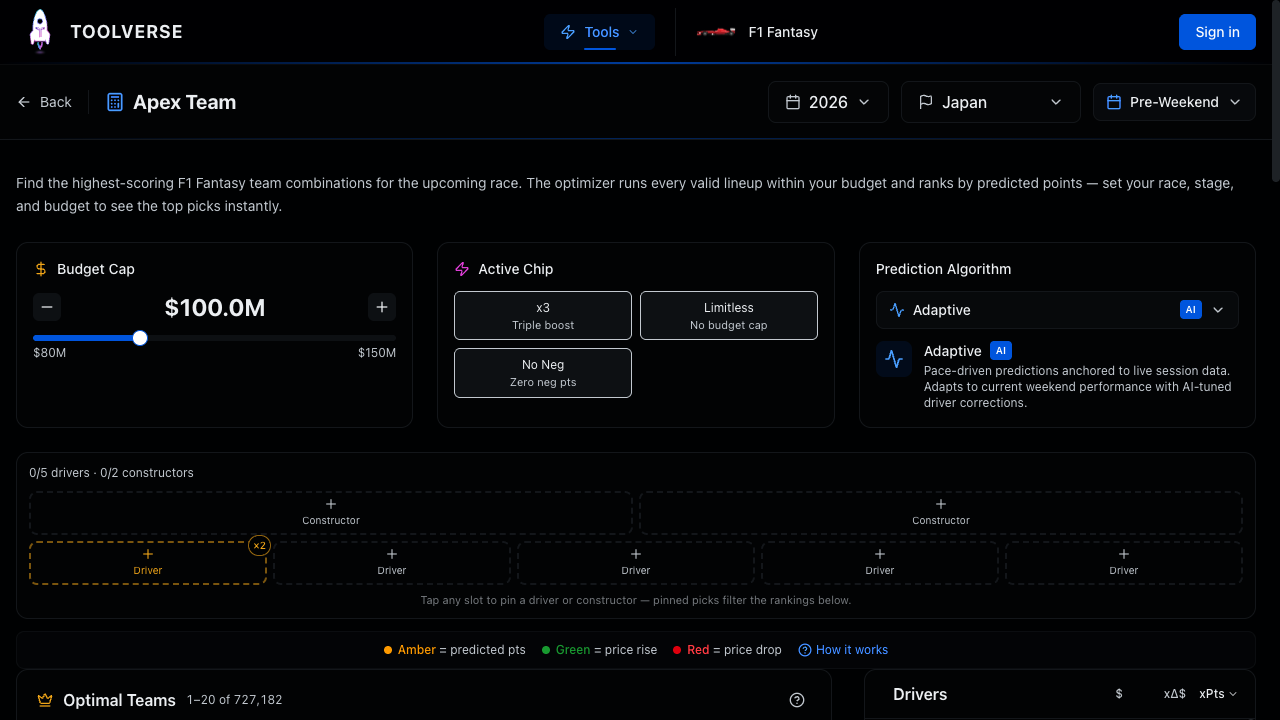
The optimizer offers five prediction algorithms, each weighting historical data differently:
| Algorithm | Best Used When | What It Does |
|---|---|---|
| Adaptive (default) | FP3 onward (lock stage) | Blends live session pace with Monte Carlo corrections |
| Momentum | Pre-weekend planning | Weights the last 2 races heavily for recent form |
| Recent Form | Balanced analysis | Equal weight on the last 5 races |
| Hot Streak | After major form shifts | Uses only the last 2 races for maximum reactivity |
| Season Overview | Conservative baseline | Equal weight across the entire season |
Not sure which to pick? Start with Adaptive. It automatically adjusts as the weekend progresses, blending practice session data into its predictions.
Step 3: Set Your Budget
The default budget is $100M, matching the official F1 Fantasy cap. If you've grown your budget through smart price-change picks, adjust the slider to your actual budget. Even a $1M increase opens up significantly better team options.
Want to see what you'd build with unlimited funds? Activate the Limitless chip to remove the budget constraint entirely.
Step 4: Browse the Top Teams
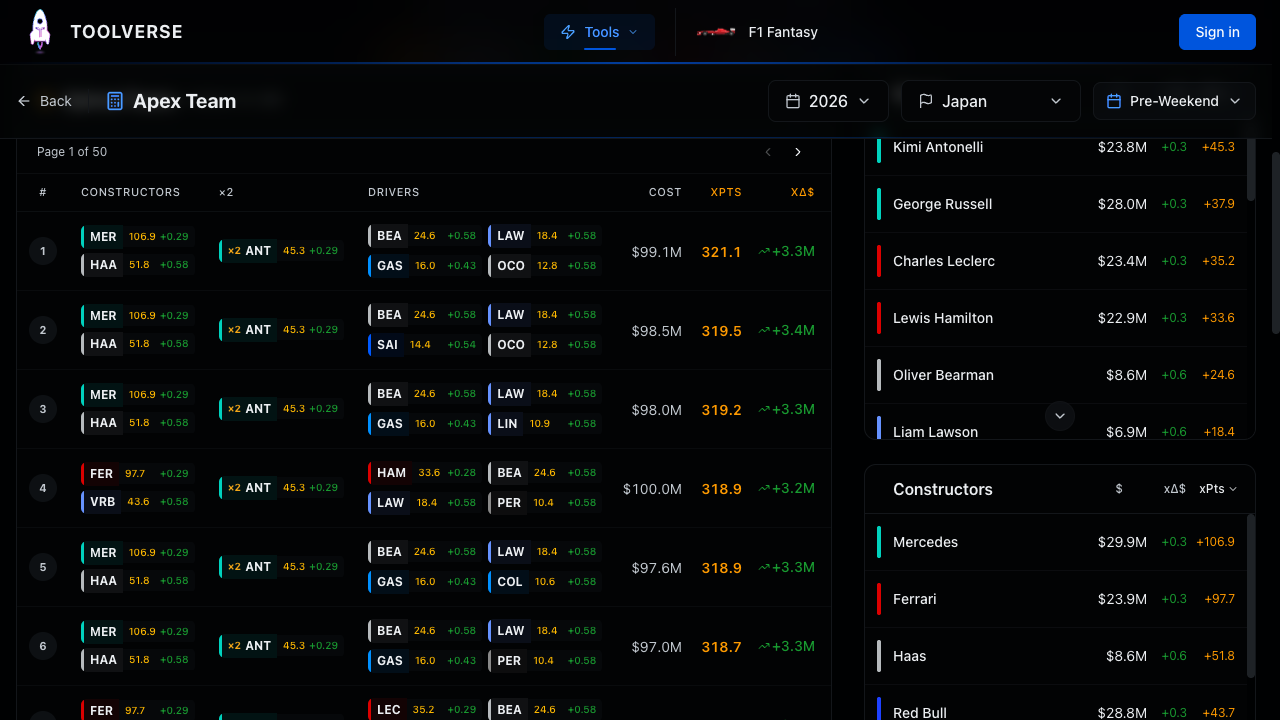
The results table shows the top 20 teams ranked by predicted points. Each row displays:
- Rank (#1 through #20)
- Constructors (your 2 constructor picks with team colors)
- Boost (which driver gets the x2 DRS multiplier)
- Drivers (your 5 driver picks with predicted points)
- Cost (total team cost in $M)
- xPts (total predicted points for the weekend)
- xDelta (predicted budget change from price movements)
The "x" prefix on points and delta means these are predictions, not actual results. After the race, these switch to actual values so you can evaluate accuracy.
Step 5: Lock In Your Preferences (Optional)
Don't want a team without your favorite driver? Open the Team Selector panel and pin specific drivers or constructors. The optimizer instantly regenerates results, showing only teams that include your locked picks.
You can also manually assign which driver gets the x2 (or x3) multiplier instead of letting the optimizer choose automatically.
Which Algorithm Should You Use and When?
The five algorithms aren't ranked from best to worst. They're designed for different moments during a race weekend. Your prediction accuracy depends on choosing the right one at the right time.
Before the weekend starts (Thursday/Friday morning): Use Momentum or Recent Form. There's no session data yet, so these algorithms rely entirely on historical performance. Momentum reacts faster to recent trends; Recent Form provides a steadier baseline.
After free practice sessions (Friday-Saturday): Switch to Adaptive. As FP1, FP2, and FP3 data arrives, the Adaptive algorithm blends it with historical predictions. By FP3, it uses 60% live session pace, making it the most accurate option at the critical lock stage.
After qualifying (Saturday evening): Adaptive becomes even sharper, with qualifying position nearly certain (0.5 standard deviation). At this point, all algorithms converge because the biggest unknown (grid position) is resolved.
After form upheavals (new team, big upgrade): If a driver has recently switched teams or received a major car upgrade, Hot Streak captures the new performance level fastest since it only considers the last 2 races.
A powerful technique: compare the top team across all five algorithms. If the same team appears #1 across 3 or more algorithms, it's a high-confidence pick. Divergence between algorithms means there's more uncertainty to consider.
How Do Chips Change Your Optimal Team?
F1 Fantasy offers six chips that modify scoring rules for a single race weekend. The Apex Team Optimizer models four of them that affect team composition:
x3 Boost (Mega Driver)
Your highest-scoring driver gets a x3 multiplier, and the second-highest gets x2. This dramatically shifts the optimal team toward one dominant driver. Activate x3 when you're confident one driver will have a standout weekend, like the pole-sitter at a track where qualifying position strongly predicts race results (Monaco, Singapore, Hungary).
Limitless
Removes the $100M budget cap entirely. Your dream team becomes possible. The optimizer will show lineups costing $120M+ if those score highest. Use this chip mid-to-late season when driver prices have inflated and your budget can't keep up with the top performers.
No Negative
Floors all negative scoring at zero. DNFs, which normally cost -20 points, become 0 instead. This makes risky drivers (those with higher DNF rates) much more attractive. Use No Negative at tracks with historically high retirement rates or in wet conditions.
Wildcard
Unlimited free transfers with no point penalty. The optimizer doesn't change its ranking for Wildcard, but it signals you can completely rebuild your team without constraints. Combine Wildcard with the optimizer to build an entirely new lineup from scratch.
When you activate a chip in the Apex Team, it recalculates all 697,680 combinations instantly. The chip column in the results table updates to show which drivers benefit most.
How to Use Predicted Price Changes for Budget Growth
Every team in the results table shows an xDelta column, the predicted total price change for that lineup. Positive values (green) mean the team's drivers and constructors are expected to rise in price. Negative values (red) mean they're expected to fall.
Early in the season, budget growth matters as much as points. A team that scores slightly fewer points but grows your budget by $2M sets you up for stronger picks in later rounds. The Budget Boost page takes this further with probability-weighted price predictions for every driver.
The strategy: in the first 3-4 races, prioritize high xDelta teams. Once your budget is $103M+, switch focus entirely to maximizing xPts (predicted points).
What Makes the Predictions Accurate?
The Monte Carlo engine breaks each driver's expected score into components:
- Qualifying points (based on historical grid position distribution)
- Race position points (adjusted for typical qualifying-to-race delta)
- Positions gained/lost (modeled from track-specific overtaking data)
- Overtakes (sampled from a Poisson distribution of historical overtake counts)
- Fastest lap probability (Bernoulli draw from career-level data)
- Driver of the Day probability (Bernoulli draw from historical frequency)
- DNF risk (based on driver and team reliability history)
Each component feeds the simulation independently, producing realistic variance. A driver who's great at overtaking but average in qualifying will have a very different probability distribution than a qualifier who loses positions on race day.
Predictions get more accurate as the weekend progresses. Pre-weekend predictions rely on historical data alone. By FP3, the Adaptive algorithm incorporates actual session pace, narrowing the uncertainty. By qualifying, the biggest variable (grid position) is known.
Tips for Getting the Most Out of the Optimizer
Compare across algorithms. If you're torn between two teams, check whether your preferred team ranks highly across multiple algorithms. Consistency across algorithms = lower risk.
Don't ignore the budget slider. Many players don't realize they've accumulated extra budget through price changes. Check your actual budget on the official F1 Fantasy site and enter it exactly. Even $0.5M more can unlock significantly better teams.
Pin strategically. If you know you want to keep 2-3 drivers from your current team (to avoid transfer penalties), pin them and let the optimizer find the best remaining picks. This is much faster than manually trying combinations.
Check back after every session. Predictions sharpen dramatically from FP1 through qualifying. A quick 30-second check after FP3 (the lock stage for most weekends) gives you the most accurate team recommendation.
Use the stage selector for "what if" analysis. You can look ahead to see how predictions change at different stages, helping you decide whether to lock your team early or wait for more data.
Frequently Asked Questions
How many team combinations does the optimizer actually check?
The optimizer evaluates all 697,680 valid combinations (C(20,5) x C(10,2)) within your budget. When you pin drivers or constructors, the search space shrinks. For example, locking 2 drivers reduces it to about 137,700 combinations. Every combination is scored and ranked with no shortcuts.
Is the Apex Team free to use?
Yes. The full optimizer with all five algorithms, chip simulation, and driver pinning is free. Premium features like the Budget Boost probability distributions are available through a short video ad or a Pro subscription.
How often should I check the optimizer during a race weekend?
At minimum, check once before the team lock deadline. For the best results, check after FP1 (to catch early surprises), after FP3 (lock stage, highest accuracy), and optionally after qualifying to confirm your team still looks optimal.
Can I use the optimizer on my phone?
Absolutely. The mobile interface uses swipeable cards instead of the desktop table layout. All features work identically, including algorithm selection, pinning, and chip simulation.
What happens if I disagree with the optimizer's top pick?
That's perfectly fine. The optimizer shows probabilities, not certainties. If your racing knowledge tells you a driver will perform differently than the model predicts, use the pinning feature to lock in your picks and let the optimizer fill the rest of your team.
Start Building Your Optimal Team
The Apex Team Optimizer takes the guesswork out of F1 Fantasy team selection. Whether you're a first-time player looking for guidance or a veteran manager chasing the global leaderboard, having 697,680 combinations ranked in under a second gives you an edge that manual team-building simply can't match.
Head to the Apex Team Optimizer to build your team for the next race weekend. For a complete introduction to the game itself, check out our beginner's guide to F1 Fantasy. And if budget management is your focus, the Budget Boost page shows which drivers are set for the biggest price rises.